
Clear your concepts with NCP-CI-AWS Questions Before Attempting Real exam
Get professional help from our NCP-CI-AWS Dumps PDF
NEW QUESTION # 29
What is an available log module when configuring a syslog server in the Prism Central Admin Center?
- A. API Audit
- B. Prism
- C. Acropolis
- D. Zookeeper
Answer: C
Explanation:
When configuring a syslog server in the Prism Central Admin Center for Nutanix, one of the available log modules is Acropolis.
The Acropolis module logs system events related to the Nutanix Acropolis operating system, which is critical for monitoring and auditing system activities and performance.
Configuring syslog with the Acropolis module ensures that important events and issues related to the Acropolis environment are captured and can be forwarded to an external syslog server for centralized logging and analysis.
Reference:
Refer to the Nutanix documentation on Prism Central and syslog configuration for the full list of available log modules and detailed steps for configuration.
NEW QUESTION # 30
An administrator has deployed an NC2 on AWS cluster and doesn't have connectivity back to the on-premises environment yet. The administrator wants to SSH into a CVM to edit a security setting and has deployed a Jump Host into an existing public subnet.
What action must the administrator still take to gain access to the CVM?
- A. Edit the UVM security group to allow SSH from the Jump Host IP and remove Cluster Lockdown.
- B. Edit the CVM iptables to allow SSH.
- C. Edit the User Management Network Security Group to allow SSH from the Jump Host IP.
- D. Create Custom Network Security Group at the subnet level and add the IP address of the Jump Host
Answer: C
Explanation:
To SSH into a Controller VM (CVM) in an NC2 on AWS cluster without on-premises connectivity, the administrator needs to ensure that the security settings allow SSH access from the Jump Host. This involves editing the User Management Network Security Group to permit SSH traffic from the Jump Host IP.
Deploy Jump Host:
Ensure the Jump Host is deployed in a public subnet with an Elastic IP (EIP) assigned for external access.
Edit User Management Network Security Group:
Locate the security group associated with the user management network.
Modify the inbound rules to allow SSH (port 22) from the Jump Host's IP address. This ensures that the Jump Host can establish an SSH connection to the CVM.
Steps to Edit Security Group:
Navigate to the EC2 dashboard in the AWS Management Console.
Select "Security Groups" under the "Network & Security" section.
Find and select the appropriate security group.
Edit the inbound rules to add a new rule:
Type: SSH
Protocol: TCP
Port Range: 22
Source: Custom IP (enter the Jump Host's public IP address)
Additional Configuration:
Ensure that the CVM itself allows SSH connections and that no internal firewall rules block the traffic.
Reference:
Nutanix Cloud Clusters on AWS Administration Guide
AWS Security Group Documentation
Nutanix Best Practices for Secure Access
NEW QUESTION # 31
An administrator has noticed the company's NC2 free trial expired 60 days ago.
What should the administrator do to continue using all of the NC2 features on existing clusters?
- A. Switch to a paid subscription plan.
- B. Contact Nutanix support to redeploy the cluster.
- C. Nothing. The clusters will have full feature support.
- D. Contact the AWS cloud vendor.
Answer: A
NEW QUESTION # 32
To manually create an AWS VPC with Public access to Prism Element for testing purposes, Which components must be created?
- A. VPC Subnets Route subnets, Route Tables, NAT Gateway, Internet Gateway, VPN
- B. VPC, Delegated Subnets, Route Tables, NAT Gateway, Internet Gateway, Load balancer
- C. VPC Subnets Route Tables NAT Gateway, Internet Gateway, Load balancer
- D. VPC, Delegated Subnets, Route Tables, NAT Gateway, vNets, Load balancer
Answer: B
Explanation:
To manually create an AWS VPC with Public access to Prism Element for testing purposes, the following components must be created:
VPC: A Virtual Private Cloud to provide an isolated network for the resources.
Delegated Subnets: Subnets within the VPC to segment the network and allocate IP ranges.
Route Tables: To define routing rules for the subnets to ensure proper traffic flow.
NAT Gateway: To enable instances in the private subnets to access the internet.
Internet Gateway: To allow direct internet access to instances in the public subnets.
Load Balancer: To distribute traffic across multiple instances for improved availability and redundancy.
Reference:
Refer to the AWS documentation on VPC creation and Nutanix documentation on network setup for Prism Element access.
NEW QUESTION # 33
In which two ways should an NC2 on AWS cluster be hibernated manually? (Choose two.)
- A. Log into NC2 console, find the cluster name and select Hibernate/Resume from the ellipses.
- B. Log into Prism, Central, navigate to Planning, find hibernate and resume.
- C. Log into Prism Element navigate to Settings and select Hibernate/Resume.
- D. Select the cluster under NC2 console and Select Hibernate/Resume on the cluster sur page.
Answer: A,D
NEW QUESTION # 34
An administrator is deploying an NC2 cluster on AWS in the us-west-2 region. A VPC, management subnet, and a VM subnet are already created in the target region.
The management subnet has a local route and a route to the internet. The subnet has a route and a route to the NAT gateway. During the deployment, the management subnet appears in the drop-down list in the Create Cluster wizard, but cannot be selected.
What is the cause of this problem?
- A. The subnet has an IPv4 CIDR block but does not have an IPv6 CIDR block.
- B. The subnet does not have route to a Site-to-Site VPN connection through a virtual private gateway.
- C. The subnet has a direct route to an Internet gateway.
- D. The subnet has both an IPv4 CIDR block and an IPv6 CIDR block.
Answer: D
Explanation:
The Nutanix Create Cluster wizard may not support selecting subnets that have both IPv4 and IPv6 CIDR blocks due to compatibility or configuration constraints.
When a subnet with both CIDR blocks is present, it can cause issues in the selection process during cluster creation, as the system might not be able to properly handle or recognize the dual-stack configuration.
Ensuring that the management subnet has only an IPv4 CIDR block, without an IPv6 CIDR block, could resolve this issue and allow for successful selection in the cluster creation wizard.
Reference:
Refer to the Nutanix and AWS documentation on subnet configuration and requirements for NC2 cluster deployments, specifically addressing IPv4 and IPv6 compatibility and constraints.
NEW QUESTION # 35
An administrator is seeking help with an ongoing NC2 issue. After reaching out to Nutanix support, the administrator is introduced to NC2 specialist who can help troubleshoot the problem.
- A. Ensure the specialist is assigned the RBAC role with proper permissions.
- B. Provide the specialist with the administrator's login credentials.
- C. Confirm the Support Authorization on the organization is set to Full Access.
- D. Add the specialist as an admin user to the organizations.
Answer: A,C
Explanation:
Ensure the specialist is assigned the RBAC role with proper permissions (Answer A):
Role-Based Access Control (RBAC) ensures that the specialist has the necessary permissions to troubleshoot and manage the NC2 environment. This avoids unnecessary privilege escalations and maintains security.
Confirm the Support Authorization on the organization is set to Full Access (Answer C):
Setting the Support Authorization to Full Access allows the Nutanix support specialist to have the required access to investigate and resolve issues in the environment. This is essential for effective troubleshooting.
Reference:
Nutanix RBAC Documentation
Nutanix Support Access Guide
NEW QUESTION # 36
An administrator needs the permissions to create and manage multiple organizations and clusters in NC2, as well as manage user access for the entire company.
What role should be assigned to meet the minimum requirements of this task?
- A. Customer Security Administrator
- B. Customer Administrator
- C. Organization Administrator
- D. Cluster Administrator
Answer: B
Explanation:
The role of "Customer Administrator" in Nutanix Cloud Integration with AWS (NC2) is designed to meet the requirements of creating and managing multiple organizations and clusters, as well as managing user access for the entire company.
Roles and Permissions:
Customer Administrator: This role has the broadest set of permissions, allowing the user to create and manage organizations, clusters, and user access across the entire company. It encompasses administrative control over multiple aspects of the NC2 environment.
Capabilities:
Organization Management: Ability to create and manage multiple organizations.
Cluster Management: Full control over creating, configuring, and managing clusters.
User Access Management: Manage user roles and permissions, ensuring that the right individuals have access to the necessary resources.
Why Not Other Roles:
Organization Administrator: Limited to managing organizations but not clusters and user access at the company level.
Customer Security Administrator: Focuses on security aspects, lacking broader administrative capabilities.
Cluster Administrator: Limited to managing clusters without the ability to manage organizations and user access comprehensively.
Reference:
Nutanix Cloud Clusters on AWS Administration Guide
Nutanix Role-Based Access Control Documentation
NEW QUESTION # 37
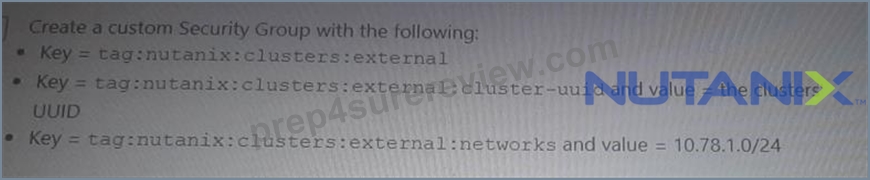
An administrator has deployed an NC2 on AWS cluster that is running mixed workloads. Multiple SQL database are running on the NC2 cluster using a native subnet of 10.78.1.0/24.
The administrator wants to ensure only application servers from source subnet 10.79.1.0/24 that reside outside of the NC2 cluster can access the databases.
Which two actions will help the administrator most securely achieve this? (Choose two.)
- A.

- B.
- C.

- D.

Answer: B,D
Explanation:
To ensure that only application servers from the source subnet 10.79.1.0/24 can access the SQL databases running on the NC2 cluster in the subnet 10.78.1.0/24, the administrator can take the following actions:
Option A: Create a custom Security Group with the following rules:
Key = tag:nutanix:clusters
Key = tag:nutanix:clusters:external
and value = the clusters' UUID
Key = tag:nutanix:clusters:external
and value = 10.78.1.0/24
Option D: Create a custom Security Group with the following:
Key = nutanix:clusters
Key = nutanix:clusters:external
and value = the clusters' UUID
Key = nutanix:clusters:external
and value = 10.79.1.0/24
These actions help create security rules that restrict access to the databases only from the specified source subnet, ensuring secure and controlled access.
Reference:
Nutanix Cloud Clusters on AWS Administration
AWS Security Groups Documentation
NEW QUESTION # 38
Which statement is true regarding AWS account requirements?
- A. IAMFullAccess permission gets configuration details for supported AWS resources.
- B. NC2 on AWS uses AWS Secrets Manager for maintaining any stored secrets.
- C. An AWS root user can be used for any deployment or operations related to NC2.
- D. AWSCloudFormationFullAccess role is required to create a CloudFormation stack.
Answer: D
Explanation:
To create a CloudFormation stack, the AWSCloudFormationFullAccess role is required.
This role grants the necessary permissions to create, update, and delete CloudFormation stacks, which are essential for deploying and managing AWS infrastructure using CloudFormation templates.
CloudFormation stacks are often used to automate the deployment of complex infrastructures, including those required for NC2 on AWS.
Proper permissions ensure that the deployment process is seamless and adheres to the security and operational policies of the organization.
Reference:
Refer to the AWS IAM documentation for details on the AWSCloudFormationFullAccess role and Nutanix documentation on prerequisites for deploying NC2 on AWS.
NEW QUESTION # 39
An administrator has been tasked with deploying an NC2 cluster on AWS with the requirement to protect workloads. Which two options are valid to protect the workloads on this cluster? (Choose two.)
- A. Deploy a cluster across two availability zones.
- B. Deploy one-node cluster in another availability zone.
- C. Use an existing on-prem Nutanix cluster as a disaster recovery target.
- D. Create a second NCZ cluster in a different availability zone.
Answer: D
Explanation:
To protect workloads on an NC2 cluster on AWS, deploying strategies that ensure high availability and disaster recovery are essential. The two valid options are:
Create a Second NC2 Cluster in a Different Availability Zone:
High Availability: Deploying a second NC2 cluster in a different availability zone ensures that workloads can be quickly recovered in case of an availability zone failure.
Disaster Recovery: This setup enables asynchronous replication between clusters, providing a robust disaster recovery solution.
Use an Existing On-Prem Nutanix Cluster as a Disaster Recovery Target:
Hybrid DR: Leveraging an existing on-premises Nutanix cluster for disaster recovery provides a cost-effective and efficient DR solution.
Replication: Set up replication policies to ensure data is consistently copied from the NC2 cluster on AWS to the on-premises cluster.
Why Not Other Options:
One-node cluster in another availability zone: Not a valid DR solution as a single-node cluster cannot provide the required resilience and high availability.
Deploy a cluster across two availability zones: While this can enhance availability, it is not a typical approach for Nutanix clusters which are designed to operate within a single availability zone for simplicity and performance reasons.
Reference:
Nutanix Cloud Clusters on AWS Administration Guide
Nutanix Disaster Recovery Best Practices
AWS Availability Zones and Disaster Recovery Documentation
NEW QUESTION # 40
An administrator needs to create user VM subnets for multiple NC2 clusters in AWS.
What would be the best approach to take?
- A. Create guest-VM subnets to be shared by all clusters.
- B. Use the cluster management subnet dedicated to each cluster.
- C. Create guest-VM subnets for each cluster.
- D. Create guest-VM VNets for each cluster.
Answer: C
Explanation:
When creating user VM subnets for multiple NC2 clusters in AWS, the best approach is to create guest-VM subnets for each cluster. This ensures that each cluster has its own dedicated subnets, which simplifies network management and avoids potential IP conflicts.
Advantages of Dedicated Subnets:
Isolation: Each cluster operates in its own subnet, providing better isolation and security.
Management: Easier to manage and troubleshoot network issues when each cluster has its own subnets.
Scalability: More scalable as each subnet can be managed and expanded independently.
Steps to Create Guest-VM Subnets:
Identify the IP range for each subnet.
In the AWS VPC console, create a new subnet for each cluster using the identified IP ranges.
Associate the new subnets with the respective clusters during or after the cluster deployment process.
Why Not Shared Subnets:
Shared subnets could lead to IP conflicts and make network management more complex, especially as the number of clusters grows.
Reference:
Nutanix Cloud Clusters on AWS Administration Guide
AWS VPC Subnet Creation Documentation
NEW QUESTION # 41
An administrator has deployed an NC2 cluster on AWS to an existing environment for VDI.
Afterwards, the corporate security teams direct the administrator to reuse an existing AWS subnet, 10.79.4.0/24 that has two EC2 instances: EC2-1 (10.79.4.200) and EC2-2 (10.79.4.201). The security team indicates that this directive is to avoid overlap with the AHV IPAM.
Which two configuration actions should the administrator take to ensure there are no configuration issues? (Choose two.)
- A. Configure the AHV JPAM to use DHCP range 10.79.4.2 -10.79.4.253.
- B. aCLI > net.de/ete_from_ip_blacklist 10.79.4.200 aCLI > net.defete_fromjp_blacklist 10.79.4.201
- C. Deploy two VMs on the NC2 cluster and assign 10.79.4.200 and 10.79.4.201 as the assigned IPs in Prism Element
- D. aCLI > net.add_to_ip_bfacklist 10.79.4.200 aCLI > net.add_to_ip_blacklist 10.79.4.201
Answer: A,D
Explanation:
To avoid IP address conflicts and ensure there are no configuration issues when reusing an existing AWS subnet, the administrator should take the following actions:
aCLI > net.add_to_ip_blacklist 10.79.4.200 aCLI > net.add_to_ip_blacklist 10.79.4.201 (Answer A):
This command adds the specified IP addresses to the blacklist, preventing AHV IPAM from assigning these addresses to any VMs. This ensures that the existing EC2 instances with IPs 10.79.4.200 and 10.79.4.201 are not allocated to other VMs in the NC2 cluster.
Configure the AHV IPAM to use DHCP range 10.79.4.2 -10.79.4.253 (Answer D):
By configuring the AHV IPAM to use a specific DHCP range, you ensure that the IP addresses assigned to the EC2 instances (10.79.4.200 and 10.79.4.201) are not included in the DHCP pool. This prevents IP address conflicts within the subnet.
Reference:
Nutanix aCLI Reference
Nutanix NC2 on AWS Documentation
AWS VPC and Subnet Basics
NEW QUESTION # 42
A company has just adopted Nutanix as their technology of choice and is preparing to deploy Nutanix Cloud Clusters (NC2).
Which step must be taken first to again access to the CN2 console?
- A. Navigate to cloud.nutanix.com
- B. Open a support case with Nutanix.
- C. Start a free trial via Billing Portal.
- D. Create a My Nutanix account
Answer: D
Explanation:
Before accessing the Nutanix Cloud Clusters (NC2) console, the first step is to create a My Nutanix account.
This account serves as the primary gateway for managing and accessing Nutanix services, including NC2.
Once the account is created, users can log in to the Nutanix portal, where they can manage their subscriptions, start trials, and access various Nutanix services, including the NC2 console.
Reference:
Refer to the Nutanix documentation on getting started with NC2 and the My Nutanix account creation process.
NEW QUESTION # 43
Which address must AWS Directory Service be able to resolve when deploying a new NC2 cluster?
- A. gateway-internal-api.cloud.nutanix.com
- B. apikeys.nutanix.com
- C. dovvnloads.cloud.nutanix.com
- D. gateway-external-api. cloud, nutanix.com
Answer: D
Explanation:
When deploying a new NC2 cluster, the AWS Directory Service must be able to resolve the address gateway-external-api.cloud.nutanix.com.
This external API gateway is critical for the NC2 cluster to communicate with Nutanix services for operations such as management, updates, and licensing.
Ensuring that this address can be resolved allows the cluster to interact properly with the Nutanix cloud infrastructure and services.
Reference:
Refer to the Nutanix documentation on network and DNS requirements for NC2 deployments, specifically the addresses that need to be resolvable for proper functionality.
NEW QUESTION # 44
An administrator has been tasked with ensuring NC2 VMs are able to access AWS resources. The NC2 VM traffic must not traverse the internet.
in which two ways would the administrator achieve this? (Choose two.)
- A. By using an Interface Endpoint
- B. By using a VPC Peer.
- C. By using a Gateway Endpoint
- D. By using a NAT Gateway.
Answer: A,B
Explanation:
To ensure that NC2 VMs can access AWS resources without traversing the internet, the administrator can use AWS VPC Peering and Interface Endpoints. Both methods ensure that traffic stays within the AWS network, maintaining security and efficiency.
Interface Endpoint:
Interface Endpoints allow you to privately connect your VPC to supported AWS services. They use AWS PrivateLink to route traffic directly to services within the AWS network, bypassing the public internet.
Steps:
Create an interface endpoint for the required service in the AWS VPC console.
Ensure the security groups and route tables are configured to allow traffic to the interface endpoint.
VPC Peering:
VPC Peering allows the routing of traffic between VPCs using private IP addresses, without the need for internet gateways, NAT devices, or VPN connections.
Steps:
Create a VPC peering connection between the VPCs.
Update the route tables to direct traffic between the peered VPCs.
Ensure security group rules allow the necessary traffic between VPCs.
Reference:
AWS VPC Peering Documentation
AWS Interface Endpoint Documentation
Nutanix Cloud Clusters on AWS Administration Guide
NEW QUESTION # 45
Which entity should be contacted for AOS software supported related to NC2?
- A. Partner
- B. Public Cloud Vendor
- C. Nutanix
- D. Internal IT Operations team
Answer: C
Explanation:
For AOS software support related to NC2, the appropriate entity to contact is Nutanix. Nutanix provides comprehensive support for their software, including the Acropolis Operating System (AOS) used in NC2 deployments.
Support Scope:
Nutanix offers support for the deployment, configuration, and management of NC2 clusters, including any issues related to AOS software.
This includes troubleshooting, updates, and technical assistance.
Why Not Other Options:
Internal IT Operations team: Typically handles internal issues but does not have the specialized knowledge or resources for AOS software support.
Partner: May provide support but would ultimately escalate issues to Nutanix for software-specific concerns.
Public Cloud Vendor: Manages infrastructure-related issues but does not provide support for Nutanix AOS software.
Reference:
Nutanix Support Documentation
Nutanix Cloud Clusters on AWS Administration Guide
Nutanix Best Practices for AOS Support
NEW QUESTION # 46
Which service enables the monitoring of key metrics on various AWS services, inducing EC2, EBS, and VPC for an NC2 cluster deployments?
- A. Amazon inspector
- B. Amazon CloudWatch
- C. AWS CloudTrail
- D. AWS CloudFormation
Answer: B
Explanation:
Amazon CloudWatch is the service that enables the monitoring of key metrics on various AWS services, including EC2, EBS, and VPC, for NC2 cluster deployments.
Amazon CloudWatch:
Amazon CloudWatch provides monitoring for AWS cloud resources and applications. It collects and tracks metrics, collects and monitors log files, and sets alarms.
Specifically, for NC2 deployments, CloudWatch can be used to monitor key metrics such as CPU utilization, disk I/O, network I/O for EC2 instances, EBS volume performance, and VPC network traffic.
Features:
Metrics Monitoring: Collects and visualizes operational data in the form of metrics, including utilization, performance, and health.
Logs Monitoring: Collects log data, monitors it in real-time, and triggers alarms based on predefined thresholds.
Alarms: Notifies when operational performance thresholds are breached.
Integration with NC2:
By setting up CloudWatch, administrators can ensure they have visibility into the performance and health of their Nutanix clusters on AWS, aiding in proactive management and troubleshooting.
Reference:
Amazon CloudWatch Documentation
Nutanix Cloud Clusters on AWS Administration Guide
AWS Monitoring Best Practices
NEW QUESTION # 47
An administrator plans to reserve Nutanix licenses for NC2 consumption.
Which two statements are correct? (Choose two.)
- A. Capacity reserved from a license can cover usage for all NC2 clusters associated with that workspace.
- B. The license reservation must be deleted when terminating or hibernating an NC2 cluster.
- C. A reserved license can be unreserved and used it for an on-premises cluster by updating the reserved capacity of that license to zero.
- D. If one NC2 cluster is terminated and another NC2 cluster is created, the reserved capacity must be manually used to cover the new cluster's usage.
Answer: A,C
NEW QUESTION # 48
......
Nutanix NCP-CI-AWS Exam Syllabus Topics:
| Topic | Details |
|---|---|
| Topic 1 |
|
| Topic 2 |
|
| Topic 3 |
|
| Topic 4 |
|
Achieve the NCP-CI-AWS Exam Best Results with Help from Nutanix Certified Experts: https://www.prep4surereview.com/NCP-CI-AWS-latest-braindumps.html
Give You Free Regular Updates on NCP-CI-AWS Exam Questions: https://drive.google.com/open?id=1vFnFmUHMqd6WskVv_6_clV8m4UrW3tXo
