
Certification Training for Observability-Self-Hosted-Fundamentals Exam Dumps Test Engine [2026]
Apr 07, 2026 Step by Step Guide to Prepare for Observability-Self-Hosted-Fundamentals Exam
SolarWinds Observability-Self-Hosted-Fundamentals Exam Syllabus Topics:
| Topic | Details |
|---|---|
| Topic 1 |
|
| Topic 2 |
|
| Topic 3 |
|
| Topic 4 |
|
| Topic 5 |
|
NEW QUESTION # 30
Several active directory groups have access to SolarWinds Hybrid Cloud Observability (HCO). There are three additional groups to be added, however they are not showing up on a search. Why can the additional groups not be added?
- A. missing groups exceed the maximum number of groups
- B. missing groups have too many users
- C. missing groups are distribution groups
- D. missing groups have users already present in added groups
Answer: C
Explanation:
When integrating Active Directory (AD) with the SolarWinds Platform, the system is designed to leverage AD groups for role-based access control (RBAC). According to theSolarWinds Platform Administrator Guide
, the platform specifically requiresSecurity Groupsfor authentication and permission mapping.
Active Directory contains two primary group types:Security GroupsandDistribution Groups. Distribution groups are intended purely for email lists and do not have a Security Identifier (SID) that can be used for assigning file system or application permissions. Because SolarWinds relies on the SID to grant web console access and define user rights,distribution groupswill not appear in the search results when attempting to add new Windows groups to the platform. To resolve this, the AD administrator must either convert the existing distribution groups to security groups or create new security groups containing the desired users. Once the group type is set correctly to "Security," the SolarWinds search utility will be able to resolve the group name and SID, allowing it to be imported and assigned permissions within the console.
NEW QUESTION # 31
Agents have been deployed to a Windows server on a network. The agent is to initiate communication with the application server for all agents. Which firewall port needs to be opened?
- A. TCP 17790
- B. TCP 17777
- C. TCP 445
- D. TCP 17778
Answer: D
Explanation:
SolarWinds agents support two communication modes: "Server-Initiated" (Passive) and "Agent-Initiated" (Active). According to theSolarWinds Platform Agent requirements and port information, the direction of communication determines which firewall ports must be open.
When an agent is configured forAgent-Initiated communication(where the agent on the managed node reaches out to the SolarWinds server), it usesTCP port 17778. This port must be open for inbound traffic on the SolarWinds Main Polling Engine or Additional Polling Engine. This mode is highly beneficial for monitoring servers in DMZs or remote sites where the SolarWinds server cannot initiate a connection through the firewall, but the remote node is allowed to communicate back to the primary management network. Port
17777 (Option B) is used for the legacy Orion Information Service, and 17790 (Option D) is used for specific client-to-server messaging in different contexts, but 17778 is the dedicated, encrypted port for agent-initiated data transmission.
NEW QUESTION # 32
What is supported when importing custom property values to SolarWinds* Hybrid Cloud Observability (HCO)?
- A. importing values from .json file format
- B. importing complex .xls or .xlsx files
- C. incoming values validated before being written
- D. incoming values can contain special characters
Answer: C
Explanation:
The Custom Property Import tool is designed to help administrators bulk-update metadata for hundreds or thousands of nodes simultaneously. According to theSolarWinds Platform Administrator Guide, maintaining data integrity is a priority during this process.
A critical feature supported during the import is thatincoming values are validated before being written (D)
. When an administrator uploads a CSV or Excel file containing custom property values, the platform performs a validation check against the defined "Type" of each property in the database. For example, if a custom property InstallDate is defined as a "Date" type, and the import file contains a text string like "Last Tuesday," the validation engine will flag an error and prevent the import from corrupting the database. This validation also checks for character limits and ensures that values for restricted "Drop-down" properties match the predefined allowed list. This safeguard is essential for ensuring that automated alerts and reports, which rely on this metadata, function correctly without being disrupted by malformed data entries.
NEW QUESTION # 33
The built-in custom property, AssetTag, was set to mandatory after device monitoring had been set up. Which two of the following results can be expected from this action? (Choose two.)
- A. asset tag must be provided after the action for all existing monitored devices
- B. asset tag must be provided for all existing monitored devices when polled
- C. asset tag must be provided immediately for all existing monitored devices
- D. asset tag must be provided for all existing monitored devices when edited
Answer: A,D
Explanation:
Custom properties can be configured as "Mandatory" to ensure data integrity across the platform. According to theSolarWinds Platform Administrator Guide, changing a property like AssetTag to mandatory after nodes already exist creates an enforcement requirement.
The system does not retroactively block polling or delete nodes (Option B and D are incorrect), but it enforces the requirement during administrative interaction. Specifically:
* Requirement after the action (A): Moving forward, any new node added to the system will require the AssetTag field to be populated before the node can be saved.
* Requirement when edited (C): For existing nodes that do not yet have an AssetTag, the platform will permit them to exist and be polled normally. However, the next time an administrator attempts toeditthe properties of that node, the Web Console will block the "Save" action until a value is provided for the mandatory AssetTag field. This ensures that as the environment is managed over time, the metadata is gradually backfilled until all mandatory requirements are satisfied.
NEW QUESTION # 34
User access is being modified by adding Windows groups and setting group permissions. Two users are in multiple groups with different permissions. The correct permissions need to be applied to the users involved in multiple groups. Which two of the following actions will accomplish this goal? (Choose two.)
- A. add users as individual users and configure permissions
- B. re-order groups to apply correct permissions in order
- C. remove users' accounts and create individual accounts
- D. remove impacted groups and add all users individually
Answer: A,B
Explanation:
Managing user permissions through Active Directory (AD) groups in SolarWinds requires an understanding of how the platform resolves conflicting rights. When a user belongs to multiple groups, the platform must determine which set of permissions takes precedence. According to theSolarWinds Platform User Account Managementguide, there are two primary ways to ensure the "correct" (often the most restrictive or most specific) permissions are applied.
* Add users as individual users (A): Individual user account settings always take precedence over group settings in the SolarWinds Platform. If a user needs specific rights that differ from their assigned AD groups, creating a local or AD-linked individual account for them allows the administrator to "override" group-level permissions with 100% certainty.
* Re-order groups (D): The SolarWinds Web Console allows administrators to change thesearch order of groups. When a user logs in, the platform checks the groups in the order they are listed in the
"Manage Accounts" screen. The first group match it finds is the one that defines the user's session permissions. By re-ordering the groups, an admin can ensure that the group with the "correct" intended permissions is processed first.
Options B and C are inefficient and unnecessary "nuclear" options that disrupt the benefits of using centralized AD management for the rest of the organization.
NEW QUESTION # 35
A network discovery job was performed. The job was not correctly defined and not all devices were discovered within the network. What is the likely reason for the skipped devices?
- A. The missing devices were configured for SNPMvS.
- B. The network discovery timeout was too short
- C. The preferred polling method in the discovery job was set to WML
- D. The missing devices were included in the discovery ignore list.
Answer: D
Explanation:
Network Discovery is an automated process to scan subnets and import new infrastructure. However, the discovery engine includes logic to prevent duplicate entries and ignore non-relevant assets. According to the SolarWinds Platform Administrator Guide, if specific devices are missing from the results, the most common administrative cause is theDiscovery Ignore List.
The "Ignore List" is a database of IP addresses or MAC addresses that the platform has been explicitly told to skip. This often happens if a device was previously discovered but the administrator chose "Ignore this node" during the import phase. The system remembers this choice to prevent the device from reappearing in every subsequent scan. Additionally, the platform automatically ignores any node that isalready presentin the
"Manage Nodes" list to avoid creating redundant monitoring objects.
While a timeout (Option C) or incorrect polling method (Option D) could cause a node to fail to respond with its full metadata, the device would typically still appear in the discovery results as a "Generic" or "ICMP- only" device rather than being skipped entirely. Only theIgnore Listor pre-existing status causes a device to be excluded from the discovery results table during a scan of a valid subnet.
NEW QUESTION # 36
What is the effect of checking the Encrypt connections with SSL box in the configuration wizard?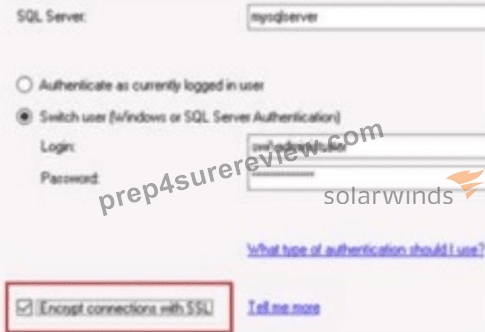
- A. The network data between SolarWinds' Hybrid Cloud Observability Platform server and the SQL server will be encrypted.
- B. The login account to access the SQL server will be encrypted and stored in SolarWinds' Hybrid Cloud Observability Platform server.
- C. The login credentials will be encrypted between SolarWinds' Hybrid Cloud Observability Platform server and the SQL server while in transit.
- D. The installed SolarWinds product will use the login account to access the databases on the SQL server.
Answer: A
Explanation:
According to theSolarWinds Platformconfiguration documentation, the option toEncrypt connections with SSLduring the database configuration wizard specifically dictates the security level of the communication channel between the application server and the database backend. When this box is checked, the platform ensures thatthe network data between SolarWinds' Hybrid Cloud Observability Platform server and the SQL server will be encrypted. This security measure is critical for protecting the integrity and confidentiality of the performance metrics, configuration data, and credentials as they traverse the internal network between these two primary architectural components.
This encryption utilizesTransport Layer Security (TLS)to wrap theTDS (Tabular Data Stream)protocol used by Microsoft SQL Server. By enabling this feature, the platform prevents potential "man-in-the-middle" attacks where an adversary could sniff network traffic to intercept sensitive monitoring data or administrative information stored within the SQL database. It is important to note that for this setting to function correctly, theSQL Servermust be configured with a valid SSL/TLS certificate that is trusted by the SolarWinds application server.
This setting differs from simple credential encryption (Option C) or secure storage (Option B) because it applies toall datatransmitted during the session, not just the initial login exchange. Furthermore, while the configuration wizard does require a login account (Option A), that account's specific permissions are a separate functional requirement from the underlying encryption of the transport layer. Enabling SSL encryption is a standard best practice for organizations following strict compliance frameworks likeHIPAA, PCI-DSS, orSOC2, where protecting data-in-transit is a mandatory requirement even on internal, "trusted" network segments. This centralized encryption toggle simplifies the deployment of high-security observability environments by orchestrating the secure connection parameters through the standard SolarWinds Configuration Wizard interface.
NEW QUESTION # 37
A user reported they could not see data related to monitored nodes beyond their geographical location within SolarWinds* Hybrid Cloud Observability (HCO). Other staff within the organization do not have the same problem. What is the likely cause of the issue?
- A. account has been limited to nodes within the geographical location
- B. nodes outside the user's geographical location are not monitored
- C. view limitations for those nodes beyond the user's geographical location are applied to views
- D. nodes beyond the user's geographical location are displayed in widgets that are hidden from the user
Answer: A
Explanation:
In the SolarWinds Platform, data visibility is controlled at the account level through a security feature known as Account Limitations. According to theSolarWinds Platform User Account Managementdocumentation, when a single user has restricted visibility while others do not, it points to a specificAccount Limitation applied to that user's profile.
Account limitations act as a persistent filter on the database queries performed by the Web Console during that user's session. If an administrator has configured a limitation based on a custom property like "Location" or "Region," the user will only see entities that match that specific criteria. For example, if the user's account is limited to Location = New York, they will be unable to see nodes, alerts, or reports associated with Location = London, even if those nodes are active and being monitored by the system.
This is a fundamental tool for multi-tenant environments or large enterprises where different teams are responsible for different geographic or logical segments of the network. It is more effective than "View Limitations" (Option D) because an account limitation follows the user across the entire platform, including search results, alerts, and reports, whereas a view limitation only affects a specific dashboard page. Options B and C are unlikely because they would typically affect multiple users or indicate a major monitoring gap rather than a user-specific visibility issue.
NEW QUESTION # 38
Which two of the following statements apply to predefined alerts on SolarWinds Hybrid Cloud Observability (HCO)? (Choose two.)
- A. predefined alerts with send an e-mail action require default recipients to be configured in default send email action
- B. predefined alerts with send an e-mail action will forward notifications to the product registration email as a default
- C. trigger and reset conditions of predefined alerts cannot be directly edited
- D. trigger and reset actions of predefined alerts cannot be directly edited
Answer: A,C
Explanation:
Predefined alerts(out-of-the-box alerts) come built into Hybrid Cloud Observability to provide immediate value. According to theSolarWinds Platform Alerting Guide, these alerts have specific behaviors regarding modification.
* Default Email Recipients (A): Many predefined alerts include a "Send an Email" action by default.
However, for these to work, an administrator must first configure the global SMTP settings and ensure that "Default Recipients" are defined, or the alert will have no destination for its notifications.
* Conditions cannot be directly edited (D): To protect the integrity of the built-in logic, the platform often prevents users from directly overwriting thetrigger and reset conditionsof a predefined alert.
Instead, the recommended workflow is to "Duplicate and Edit," allowing the user to create a customizable copy of the alert while keeping the original out-of-the-box version intact for reference.
Option B is incorrect as SolarWinds does not automatically use the registration email for monitoring notifications. Option C is generally incorrect because while conditions are often locked, administrators are usually allowed to add or modifyactions(like adding a specific email address) to a predefined alert to make it functional for their specific environment.
NEW QUESTION # 39
How can access to all reports be removed from user accounts?
- A. set user account report limitation to default
- B. set user account report limitation to no reports
- C. add to report group and modify access
- D. disable manage reports permissions
Answer: B
Explanation:
In the SolarWinds Platform, report access is governed by both functional permissions and account limitations.
While "Disable Manage Reports" (Option B) prevents a user from editing or creating reports, it does not necessarily hide the "Reports" menu or prevent the user from viewing existing reports they have access to. To completely remove the visibility and accessibility of all reports for a specific user account, anAccount Limitationmust be applied.
According to theSolarWinds Platform User Account Managementdocumentation, account limitations act as a security filter that restricts what the user can see throughout the entire Web Console. By navigating toSettings
> All Settings > Manage Accounts, selecting the user, andediting theirReport Limitation, an administrator can choose "No Reports". This configuration ensures that when the user logs in, the Reports section will either be empty or completely hidden from their navigation bar, regardless of their other permissions. This is the most effective method for high-security environments or multi-tenant deployments where certain users should have zero visibility into the historical performance data or inventory summaries contained within the reporting engine.
NEW QUESTION # 40
What is the minimum supported version for SolarWinds Hybrid Cloud Observability (HCO) database server?
- A. SQL server 2012 service pack 4
- B. MS SQL server 2016 service pack 1
- C. MS SQL server 2012 R2
- D. MS SQL server 2019
Answer: D
Explanation:
The transition from the legacy Orion Platform toHybrid Cloud Observability (HCO)introduced stricter hardware and software prerequisites to support modern features like AIOps, advanced mapping, and high- performance data processing. According to theSolarWinds Hybrid Cloud Observability System Requirements, the platform requires modern SQL features for optimal performance.
While legacy versions of the Orion Platform may have supported SQL Server 2016 or even 2012 in older iterations,MS SQL Server 2019is identified as theminimum supported versionfor new HCO installations.
This requirement ensures compatibility with the latest database indexing and query optimization techniques used by the SolarWinds Platform to handle the high volume of time-series data generated by observability nodes. Additionally, using SQL 2019 or later (including SQL 2022) is necessary to ensure the platform can utilize specific security protocols and memory management improvements that are not available in the end-of- life SQL 2012 or SP1 versions of 2016.
NEW QUESTION # 41
What two of the following reasons apply to creating custom views in SolarWinds' web console? (Choose two.)
- A. personalize user experience and focus on specific elements
- B. monitor devices and elements not shown in default views
- C. perform customizations with SQL queries
- D. limit user access to specific elements
Answer: A,D
Explanation:
Custom Views(Summary Views and Detail Views) are the primary way administrators control the layout and focus of the SolarWinds Web Console. According to theSolarWinds Platform Administrator Guide, views are used to tailor the platform to different user roles.
The two primary reasons for creating them are:
* Limit user access to specific elements (A): Views can be restricted to specific users or groups. By creating a custom view that only contains "Storage" widgets and assigning it to the Storage Team, an administrator can effectively limit what those users see when they log in. This prevents users from being overwhelmed by irrelevant data and acts as a functional layer of access control.
* Personalize user experience and focus on specific elements (D): Different roles require different data. A CXO might need a high-level "Map" and "SLA Trend" view, while a technician needs a "Top
10 Nodes by CPU" and "Active Alerts" view. Custom views allow the administrator to curate exactly which widgets are visible, ensuring that each user has the most relevant information for their job front- and-center.
SQL customizations(Option C) are a method of building widgets, but not thereasonfor the view itself.
Monitoring new elements (Option B) is handled through theAdd NodeandPollerssettings; a view onlydisplays what is already being monitored.
NEW QUESTION # 42
How are devices within a network that does not respond to SNMP or WMI, discovered and imported for monitoring?
- A. Increase the network discovery time out value.
- B. Include devices that only respond to ICMP in network discovery.
- C. Set a network hop value greater than 0 in the discovery settings.
- D. Select agent polling method in network discovery.
Answer: B
Explanation:
Network Discovery in the SolarWinds Platform is designed to identify as much infrastructure as possible, even if that infrastructure is "locked down." According to theSolarWinds Platform Administrator Guide, the discovery wizard follows a specific hierarchy of identification.
If a device hasSNMPorWMIdisabled (often the case for security-hardened servers, basic switches, or simple IP-enabled appliances), the platform cannot gather deep performance metrics like CPU or memory. However, the device can still be discovered and monitored for "Up/Down" availability using a simple Ping (ICMP). To ensure these devices are added to the database during a scan, the administrator must check the box to " Include devices that only respond to ICMP" during the discovery configuration. If this is not selected, the discovery engine will skip any IP address that does not provide a valid SNMP or WMI credential response, potentially leaving gaps in the network inventory. This is the standard method for monitoring "Ping-only" nodes.
NEW QUESTION # 43
From which two of the following locations can CPU load be excluded from contributing to overall node status? (Choose two.)
- A. edit node properties
- B. node child status
- C. all nodes widget
- D. mute node
Answer: A,B
Explanation:
By default, the "overall status" of a node (Up, Warning, Critical) is calculated based on its availability and the health of its child components, such as CPU and Memory. According to theSolarWinds Platform Node Managementdocumentation, administrators can fine-tune this rollup behavior to prevent non-critical metrics from turning a node "red" on the dashboard.
* Edit Node Properties (B): Inside the "Edit Node" page, there is a section for "Thresholds." Here, an administrator can uncheck the box that allows CPU load to contribute to the node's overall status. This is useful for servers that consistently run high CPU but are otherwise healthy.
* Node Child Status (D): Within the global SolarWinds settings, administrators can manage "Node Child Status Participation." This centralized menu allows you to define which sub-elements (CPU, Memory, Interfaces, etc.) are allowed to influence the parent node's status.
Muting a node(Option C) only pauses alerts and does not change how status is calculated. TheAll Nodes widget(Option A) is a visualization tool and does not provide the configuration settings to change the underlying status logic.
NEW QUESTION # 44
Which two of the following formats can chart reports be exported into?
- A. CSV
- B. pdf
- C. .xml
- D. .xls
Answer: A,B
Explanation:
The export capabilities for chart-based reports are designed to provide both a visual representation and the underlying raw data. According to theSolarWinds Platform Administrator Guide, when viewing or scheduling a report that contains charts or graphs, the system supports two primary export formats:
* PDF: This format is the standard for visual reports. It captures the rendered chart exactly as it appears in the Web Console, making it ideal for email distribution to management or for archival purposes where the visual trend is more important than the individual data points.
* CSV (Comma Separated Values): When a chart is exported to CSV, the platform extracts the time- series data points used to generate that chart. This allows technical staff to import the raw performance numbers into external tools like Excel for deeper statistical analysis that may not be possible within the standard web view.
While the broader reporting engine supportsExcel (.xls)for tabular reports (as seen in Question 8), the specific function for exportingchart componentsoften defaults to CSV for the data layer and PDF for the visual layer.
XML(Option D) is typically reserved for reportdefinitions(transferring a report from one server to another) rather than exporting the data results of a chart.
NEW QUESTION # 45
How is an existing agent's communication mode changed?
- A. configure global agent settings
- B. modify communication mode in Orion agent settings
- C. redeploy agent with desired communication mode
- D. edit in manage agents page
Answer: D
Explanation:
Once a SolarWinds agent is deployed, its communication mode (Active/Passive or Agent-Initiated/Server- Initiated) may need to be adjusted due to network changes or security requirements. According to the SolarWinds Platform Agent Managementguide, this is handled through a centralized administrative interface.
The correct method is toedit the agent in the "Manage Agents" page. By navigating toSettings > All Settings > Manage Agents, an administrator can select one or more agents and click "Edit Settings." Within this menu, the "Communication Mode" can be toggled. If the change is possible (i.e., the network allows the new path), the platform sends a command to the agent software on the remote node to switch its listening or polling behavior.
This process is designed to be seamless and does not require a fullredeploy(Option D) of the software, which would be time-consuming and disruptive. Modifying "Global Agent Settings" (Option A) would affect allnew agents but doesn't specifically target an existing agent's unique configuration. The "Manage Agents" page provides the granular control necessary to modify these communication parameters on a per-node or bulk basis.
NEW QUESTION # 46
Which three of the following actions can be taken within a PerfStack project? (Choose three.)
- A. share to non-web console users
- B. add as a menu bar item
- C. show as a dashboard graphic
- D. show as a widget in a view
Answer: A,B,D
Explanation:
PerfStack(Performance Analysis) projects are highly versatile troubleshooting assets that can be shared and integrated across the SolarWinds Platform. According to theSolarWinds Platform Administrator Guide, once a correlation project is built-linking metrics like CPU, Latency, and IOPS-it can be utilized in several ways.
* Add as a menu bar item (A): A specific PerfStack project that is used frequently (such as "Core Switch Health") can be saved and added directly to the main navigation menu. This allows users to access the troubleshooting dashboard with a single click from anywhere in the console.
* Share to non-web console users (B): PerfStack projects can be shared via a unique URL. This "Public Link" feature allows stakeholders who do not have a SolarWinds account (such as third-party vendors or executives) to view the real-time correlation data in a read-only browser view.
* Show as a widget in a view (D): PerfStack projects can be embedded into Summary Views or Node Details pages as awidget. This provides context-sensitive performance data right alongside the standard node information, allowing for "at-a-glance" correlation without leaving the main dashboard.
While PerfStack provides visual data, it is typically treated as a dynamic, interactive "Project" or "Widget" rather than a static "dashboard graphic" (Option C) in the classic sense of a standalone image or icon.
NEW QUESTION # 47
......
Ultimate Guide to Prepare Observability-Self-Hosted-Fundamentals Certification Exam for SolarWinds Certified Professional: https://www.prep4surereview.com/Observability-Self-Hosted-Fundamentals-latest-braindumps.html
SolarWinds Certified Professional Observability-Self-Hosted-Fundamentals Real Exam Questions and Answers FREE Updated: https://drive.google.com/open?id=1wooKrYa0VryM7lHL8iS2_C_n0-atFbPh
