Failing the CCST-Networking exam means paying the full registration fee a second time, and in 2026 that is a cost few candidates want to repeat. Prep4SureReview helps you walk in prepared, with 42 practice questions mapped to the current Cisco Certified Support Technician (CCST) NetworkingExam objectives.
Cisco CCST-Networking Exam Overview:
| Certification Vendor: | Cisco |
|---|---|
| Exam Name: | Cisco Certified Support Technician (CCST) Networking Exam |
| Exam Number: | CCST-Networking |
| Certificate Validity Period: | 3 years |
| Passing Score: | Scaled score (Cisco does not publicly disclose exact passing percentage; typically reported on a 1000-point scale with ~750 passing threshold) |
| Available Languages: | English |
| Exam Price: | USD 125 (varies by region and tax) |
| Exam Format: | Multiple choice, Multiple response, Drag and drop |
| Real Exam Qty: | Approximately 40–50 |
| Related Certifications: | Cisco Certified Support Technician (CCST) IT Support Cisco Certified Support Technician (CCST) Cybersecurity |
| Exam Duration: | 50 minutes |
| Recommended Training: | Cisco Learn & Certifications Portal Cisco Networking Academy - CCST Networking |
| Exam Registration: | Cisco Certification Registration Pearson VUE Cisco Exams |
| Sample Questions: |  |
| Exam Way: | Online proctored or test center (Pearson VUE) |
| Pre Condition: | No formal prerequisites required; basic computer literacy and networking fundamentals recommended. |
| Official Syllabus URL: | https://www.cisco.com/site/us/en/learn/training-certifications/certifications/cisco-certified-support-technician-networking.html |
Cisco CCST-Networking Exam Syllabus Topics:
| Section | Objectives |
|---|---|
| Topic 1: IP Connectivity | - IP addressing and routing basics
|
| Topic 2: Networking Fundamentals | - Networking concepts and models
|
| Topic 3: Security Fundamentals | - Basic network security concepts
|
| Topic 4: Network Troubleshooting | - Basic troubleshooting methodology
|
| Topic 5: Network Access | - Switching and LAN concepts
|
| Topic 6: IP Services | - Common network services
|
Everything Candidates Want to Know About the CCST-Networking Exam
The Cisco Certified Support Technician (CCST) NetworkingExam exam is the official Cisco assessment behind the Cisco Certified Support Technician (CCST) Networking credential, which sits at the Entry / Support Technician level. Passing it confirms that your skills meet the vendor's current requirements rather than a textbook outline. It also connects with related certifications such as Cisco Certified Support Technician (CCST) Cybersecurity, Cisco Certified Support Technician (CCST) IT Support, so it can anchor a broader certification path.
According to the official exam information, the Cisco Certified Support Technician (CCST) NetworkingExam exam includes Approximately 40–50 questions and gives you 50 minutes to complete them. Treat that as a pacing exercise, not just a knowledge check: bank the questions you know first, flag the ones that stall you, and circle back instead of burning minutes on a single item. Before test day, run at least one full timed session in the Prep4SureReview desktop or online test engine, so the clock never feels unfamiliar when it counts.
To pass the Cisco Certified Support Technician (CCST) NetworkingExam exam you need Scaled score (Cisco does not publicly disclose exact passing percentage; typically reported on a 1000-point scale with ~750 passing threshold), and the official registration fee is USD 125 (varies by region and tax). Keep one thing in mind: a failed attempt is not discounted, so retaking the exam means paying USD 125 (varies by region and tax) again in full. A practical safeguard is to sit a complete Prep4SureReview practice test a week or two before your exam date; if your timed scores are not sitting comfortably above the passing mark, consider pushing your booking back and drilling the weak domains first.
The official prerequisites for the Cisco Certified Support Technician (CCST) NetworkingExam exam are as follows: No formal prerequisites required; basic computer literacy and networking fundamentals recommended.. Requirements can change over time, so confirm the details on the official Cisco exam page at https://www.cisco.com/site/us/en/learn/training-certifications/certifications/cisco-certified-support-technician-networking.html before you book your seat.
You can register through the official channels listed below:
Exam delivery: Online proctored or test center (Pearson VUE).
Cisco points candidates toward the following official training options:
Official training builds the theory; the 42 practice questions from Prep4SureReview show you how that theory appears in exam-style items, which is where most study plans actually pay off.
Yes. A free PDF demo of the Cisco Certified Support Technician (CCST) NetworkingExam practice questions is available on the Prep4SureReview samples page, so you can check the question style and difficulty before spending anything. Every purchase also includes 365 days of free updates, and if your product expires after that period, you can extend the update service from your member zone at 50% off.
If you take the CCST-Networking exam within 60 days of your purchase and do not pass, Prep4SureReview offers a 100% money-back guarantee: send a scanned copy of your exam enrollment slip together with the official Score Report PDF within two days of your exam date, and the refund is processed within seven days. The candidate name must match the payer name, and the guarantee does not apply to exams taken within three days of purchase, to material that was downloaded without the exam actually being taken, or to free materials and expired orders. Prefer to keep studying instead? You can exchange your purchase for two additional exam products of equal value, free of charge, while keeping the update service on your original product. Delivery itself is instant: the download link is emailed within one minute of payment, and if nothing arrives within two hours, our support team will sort it out. There is no limit on how many computers you install the material on.
The Cisco Certified Support Technician (CCST) NetworkingExam syllabus is organized into 6 domains. The leading areas include Networking Fundamentals, IP Connectivity, and Network Troubleshooting. For the complete, topic-by-topic breakdown, scroll up to the Exam Topics section above.
Cisco Certified Support Technician (CCST) NetworkingExam Sample Questions:
Which information is included in the header of a UDP segment?
- A. Sequence numbers
- B. MAC addresses
- C. Port numbers
- D. IP addresses
Correct Answer: C 🗳️
Explanation: Only visible for Prep4SureReview members. You can sign-up / login (it's free).
Move each network type from the list on the left to the correct example on the right.
Reveal Solution Discussion 0Correct Answer:

Explanation:
* Two home office computers are connected to a switch by Ethernet cables.
* Network Type: LAN (Local Area Network)
* Explanation: A LAN connects devices within a limited area such as a home, office, or building, using Ethernet cables or Wi-Fi.
* Three government buildings in the same city connect to a cable company over coaxial cables.
* Network Type: MAN (Metropolitan Area Network)
* Explanation: A MAN connects networks across a city or campus, often using fiber optic or coaxial cables.
* A cell phone connects to a Bluetooth headset.
* Network Type: PAN (Personal Area Network)
* Explanation: A PAN connects devices within a personal workspace, typically using wireless technologies like Bluetooth.
* A financial institution connects its branches through a telecommunications service provider.
* Network Type: WAN (Wide Area Network)
* Explanation: A WAN connects multiple LANs over long distances, often using leased lines or satellite links provided by telecommunications companies.
* LAN (Local Area Network): Used for connecting devices within a small geographical area such as a single building or home.
* MAN (Metropolitan Area Network): Covers a larger geographical area than a LAN, typically a city or campus.
* PAN (Personal Area Network): Connects devices within the range of an individual person, such as connecting a phone to a Bluetooth headset.
* WAN (Wide Area Network): Spans large geographical areas, connecting multiple LANs across cities, countries, or continents.
References:
* Network Types Overview: Cisco Networking Basics
* Understanding Different Network Types: Network Types Guide
An app on a user's computer is having problems downloading data. The app uses the following URL to download data:
https://www.companypro.net:7100/api
You need to use Wireshark to capture packets sent to and received from that URL.
Which Wireshark filter options would you use to filter the results? Complete the command by selecting the correct option from each drop-down list.
Note: You will receive partial credit for each correct selection.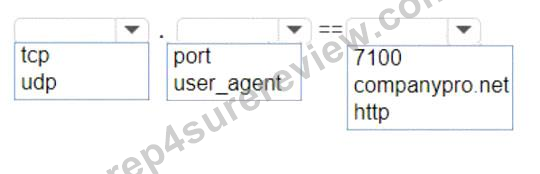
Correct Answer:
Explanation:
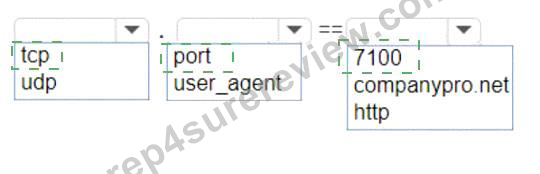
To capture packets sent to and received from the URLhttps://www.companypro.net:7100/apiusing Wireshark, you would use the following filter options:
* Protocol:tcp
* Filter Type:port
* Port Number:7100
This filter setup in Wireshark will display all TCP packets that are sent to or received from port 7100, which is the port specified in the URL for the API service. Since HTTPS typically uses TCP as the transport layer protocol, filtering by TCP and the specific port number will help isolate the relevant packets for troubleshooting the app's data download issues.
* cp: The app is using HTTPS, which relies on the TCP protocol for communication.
* port: The specific port number used by the application, which in this case is 7100.
* 7100: This is the port specified in the URL (https://www.companypro.net:7100/api).
This filter will capture all TCP traffic on port 7100, allowing you to analyze the packets related to the application's data download.
References:
* Wireshark Filters: Wireshark Display Filters
Examine the connections shown in the following image. Move the cable types on the right to the appropriate connection description on the left. You may use each cable type more than once or not at all.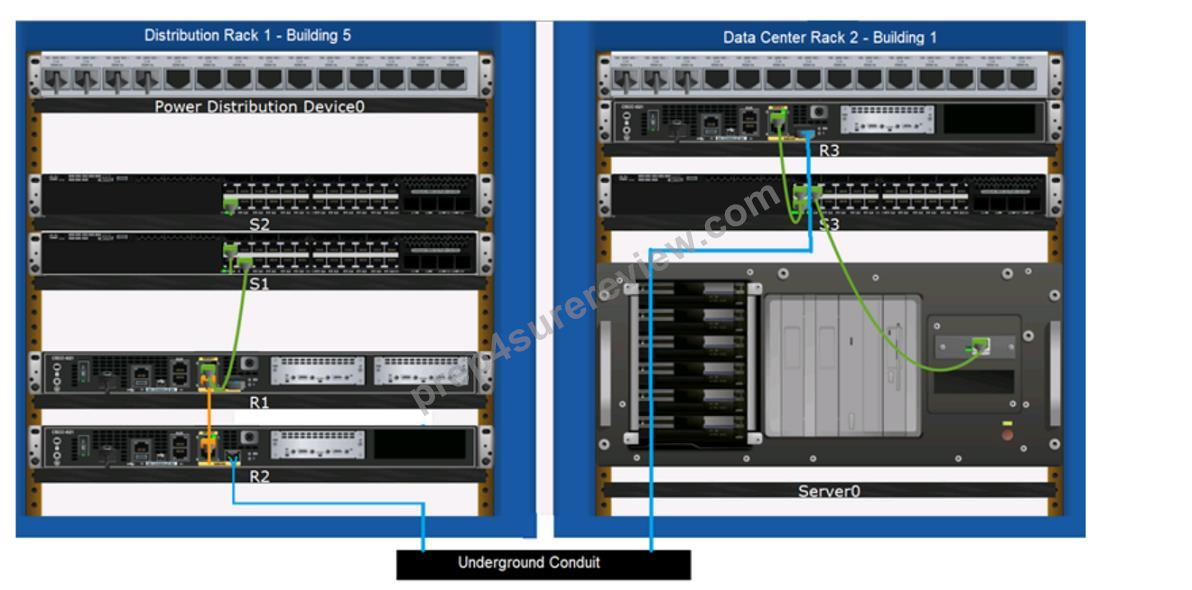
Correct Answer:

Explanation:
Based on the image description provided, here are the cable types matched with the appropriate connection descriptions:
Connects Switch S1 to Router R1 Gi0/0/1 interfaceCable Type: = Straight-through UTP Cable Connects Router R2 Gi0/0/0 to Router R3 Gi0/0/0 via underground conduitCable Type: = Fiber Optic Cable Connects Router R1 Gi0/0/0 to Router R2 Gi0/0/1Cable Type: = Crossover UTP Cable Connects Switch S3 to Server0 network interface cardCable Type: = Straight-through UTP Cable The choices are based on standard networking practices where:
* Straight-through UTP cablesare typically used to connect a switch to a router or a network interface card.
* Fiber optic cablesare ideal for long-distance, high-speed data transmission, such as connections through an underground conduit.
* Crossover UTP cablesare used to connect similar devices, such as router-to-router connections.
These matches are consistent with the color-coded cables in the image: green for switch connections, yellow for router-to-router connections within the same rack, and blue for inter-rack connections. The use of these cables follows the Ethernet cabling standards.
* Connects Switch S1 to Router R1 Gi0/0/1 interface:
* Cable Type: Straight-through UTP Cable
* Explanation: A straight-through UTP cable is typically used to connect different types of devices, such as a switch to a router.
* Connects Router R2 Gi0/0/0 to Router R3 Gi0/0/0 via underground conduit:
* Cable Type: Fiber Optic Cable
* Explanation: Fiber optic cables are used for long-distance connections, such as those through an underground conduit between buildings.
* Connects Router R1 Gi0/0/0 to Router R2 Gi0/0/1:
* Cable Type: Crossover UTP Cable
* Explanation: A crossover UTP cable is typically used to connect similar devices directly, such as router to router connections.
* Connects Switch S3 to Server0 network interface card:
* Cable Type: Straight-through UTP Cable
* Explanation: A straight-through UTP cable is typically used to connect a switch to an end device, such as a server.
* Straight-through UTP Cable: Used to connect different devices (e.g., switch to router, switch to server).
* Crossover UTP Cable: Used to connect similar devices directly (e.g., router to router, switch to switch).
* Fiber Optic Cable: Used for long-distance and high-speed connections, often between buildings or data centers.
References:
* Network Cable Types and Uses: Cisco Network Cables
* Understanding Ethernet Cabling: Ethernet Cable Guide
Move each protocol from the list on the left to the correct TCP/IP model layer on the right.
Note: You will receive partial credit for each correct match.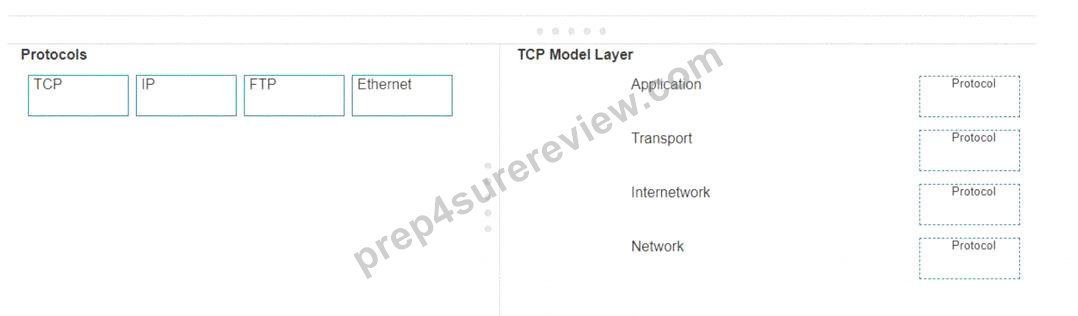
Correct Answer:
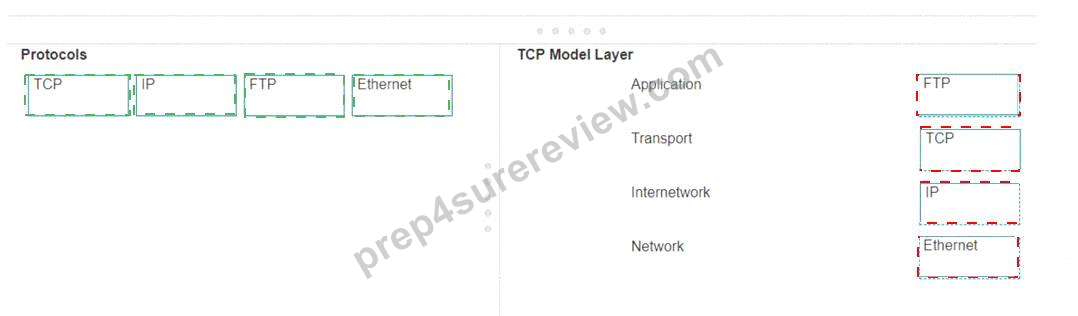
Explanation:
Here's how each protocol aligns with the correct TCP/IP model layer:
* TCP (Transmission Control Protocol): This protocol belongs to theTransportlayer, which is responsible for providing communication between applications on different hosts1.
* IP (Internet Protocol): IP is part of theInternetworklayer, which is tasked with routing packets across network boundaries to their destination1.
* FTP (File Transfer Protocol): FTP operates at theApplicationlayer, which supports application and end- user processes.It is used for transferring files over the network1.
* Ethernet: While not a protocol within the TCP/IP stack, Ethernet is associated with theNetwork Interfacelayer, which corresponds to the link layer of the TCP/IP model and is responsible for the physical transmission of data1.
The TCP/IP model layers are designed to work collaboratively to transmit data from one layer to another, with each layer having specific protocols that perform functions necessary for the data transmission process1.
* TCP:
* TCP Model Layer: Transport
* Explanation: The Transport layer is responsible for end-to-end communication and error handling. TCP (Transmission Control Protocol) operates at this layer to provide reliable, ordered, and error-checked delivery of data.
* IP:
* TCP Model Layer: Internetwork
* Explanation: The Internetwork layer, also known as the Internet layer, is responsible for logical addressing and routing. IP (Internet Protocol) operates at this layer to route packets across networks.
* FTP:
* TCP Model Layer: Application
* Explanation: The Application layer provides network services to applications. FTP (File Transfer Protocol) operates at this layer to transfer files between computers over a network.
* Ethernet:
* TCP Model Layer: Network
* Explanation: The Network layer, also known as the Link layer in the TCP/IP model, is responsible for physical addressing and access to thephysical medium. Ethernet operates at this layer to provide the physical and data link functions.
* Transport Layer: This layer is responsible for providing communication services directly to the application processes running on different hosts. TCP is a core protocol in this layer.
* Internetwork Layer: This layer is responsible for logical addressing, routing, and packet forwarding.
IP is the primary protocol for this layer.
* Application Layer: This layer interfaces directly with application processes and provides common network services. FTP is an example of a protocol operating in this layer.
* Network Layer: In the TCP/IP model, this layer includes both the data link and physical layers of the OSI model. Ethernet is a protocol used in this layer to define network standards and communication protocols at the data link and physical levels.
References:
* TCP/IP Model Overview: Cisco TCP/IP Model
* Understanding the TCP/IP Model: TCP/IP Layers
Viewing page 1 out of 9 pages.
Viewing questions 1-5 out of 42 questions.


 Clark

 Milo

 Elvira
 Ben
 Kristin
 James
 Celeste
 Harley
 Bart
 Astrid
 Bernard

 Upton
 Elvis