
JN0-452 Dumps Updated Aug 26, 2026 Practice Test and 137 unique questions
2026 Latest 100% Exam Passing Ratio - JN0-452 Dumps PDF
NEW QUESTION # 35
A client has a poor Wi-Fi experience when moving around in an office. In this scenario, which Marvis Query Language clause would help troubleshoot the problem?
- A. ROAMINGOF
- B. RANK
- C. STATUSOF
- D. UTILIZATIONOF
Answer: A
Explanation:
The ROAMINGOF clause in Marvis Query Language provides insights into a client's roaming behavior. It shows how the client transitions between APs, helping identify roaming delays, sticky clients, or coverage gaps that can cause poor Wi-Fi experience while moving around.
NEW QUESTION # 36
An organization has two sites: New York and London. They want to apply a consistent set of WLANs, security policies, and RF settings to all APs in the New York site. What is the most efficient way to achieve this in the Mist UI?
- A. Use Marvis to copy settings between APs.
- B. Configure each AP in New York individually.
- C. Create a Device Profile for each AP model.
- D. Use a Template and apply it to the New York site.
Answer: D
NEW QUESTION # 37
Which two statements are correct about Juniper Mist Dynamic Packet Capture? (Choose two.)
- A. It is automatically attached to the Affected Items list in the Successful Connects SLE.
- B. It is automatically attached to a client event displayed on the Insights page.
- C. It must be globally configured at the organization level.
- D. No configuration is necessary for Mist's Dynamic Packet Capture.
Answer: B,D
NEW QUESTION # 38
Refer to Exhibit: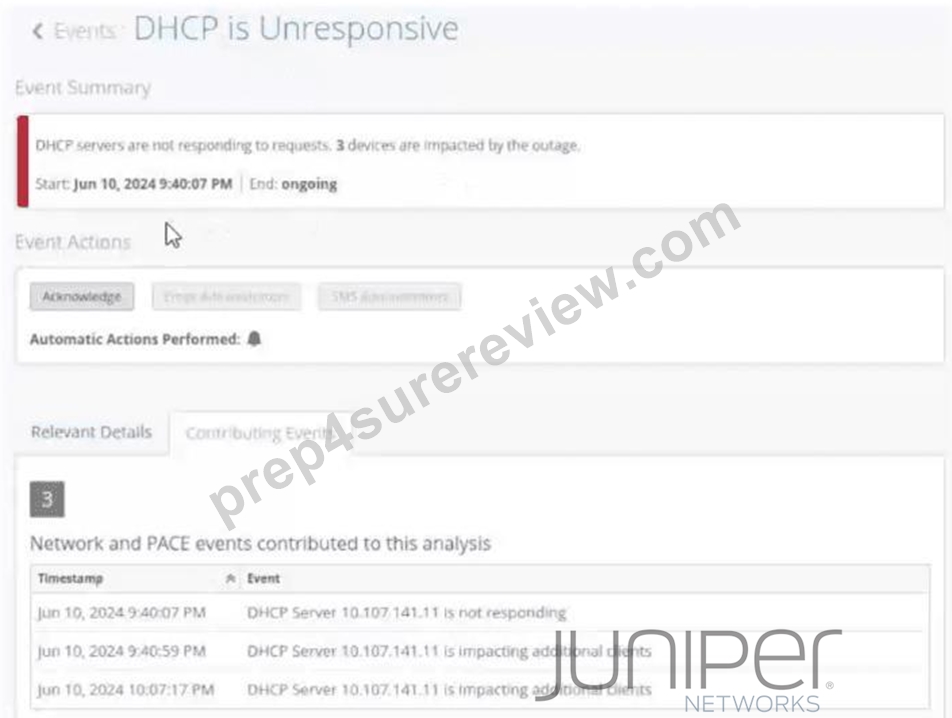
You notice that your site events show an unresponsive DHCP server in your network. You want to analyze the event by using the dynamic packet capture.
Referring to the exhibit, how would you access the packet capture for further analysis in Wireshark?
- A. Verify the impacted site and use the corresponding site event to fetch the automatically generated packet capture.
- B. Verify the impacted client and use the corresponding site event to fetch the automatically generated packet capture.
- C. Verify the impacted site and use the corresponding organization event to fetch the automatically generated packet capture.
- D. Verify the impacted client and use the corresponding client event to fetch the automatically generated packet capture.
Answer: A
Explanation:
InJuniper Networks Mist AI Wireless,dynamic packet capture (dPCAP)is tightly integrated with events to enable rapid, context-aware troubleshooting. When Mist detects a systemic issue-such as aDHCP server becoming unresponsive-it automatically generates asite-level eventbecause the problem impacts multiple devices within a site rather than a single client.
As shown in the exhibit, the event "DHCP is Unresponsive" lists multiple impacted devices and includes a timeline of contributing network events. This classification is critical: DHCP infrastructure failures are treated assite events, not client-specific or organization-wide events. When such a site event is triggered, Mist can automatically perform adynamic packet captureon the relevant access points to capture DHCP Discover, Offer, Request, and Acknowledgment (DORA) traffic in real time.
To access this packet capture, an administrator must:
* Navigate to theimpacted siteidentified in the event.
* Open thecorresponding site event(in this case, the DHCP unresponsive event).
* Download theautomatically generated packet capture file, which can then be opened inWireshark for detailed protocol-level analysis.
The incorrect options are explained as follows:
* Organization eventsprovide high-level visibility and auditing but do not host packet captures.
* Client eventsare used when a single client experiences issues; they are not appropriate when multiple devices are impacted by a shared service failure.
* Verifying an impacted client does not expose the dynamic packet capture tied to a site-wide DHCP issue.
Therefore, the correct method is toverify the impacted site and use the corresponding site event to fetch the automatically generated packet capture, makingOption Bthe correct answer.
NEW QUESTION # 39
According to Juniper Networks, it is recommended that devices using Mist location-based services (LBS) have line-of-sight to how many APs?
- A. 0
- B. 1
- C. 2
- D. 3
Answer: A
Explanation:
InJuniper Networks Mist AI Wireless, accurate location-based services (LBS) depend heavily on proper RF design and access point density. Juniper recommends that devices participating in Mist LBS maintainline-of- sight (LoS) to at least three access pointsto achieve reliable and consistent location accuracy.
Mist location services use advanced techniques such asRSSI triangulation,virtual BLE (vBLE), andAI- driven probability surface modelingto calculate a device's position. These algorithms require multiple independent signal measurements to accurately determine a device's X,Y coordinates. With signals received fromthree or more APs, Mist can triangulate the device position effectively and minimize errors caused by multipath reflections, attenuation, or transient RF noise.
If a device has line-of-sight to only one or two APs, the system lacks sufficient spatial diversity to calculate a precise location. This can result in ambiguous positioning, reduced accuracy, or excessive location "drift." While additional APs (four or more) can further improve accuracy and stability-especially in high-value use cases such as asset tracking or wayfinding-three APs is the recommended minimum baselinefor dependable LBS performance.
Mist's AI continuously evaluates signal quality, AP geometry, and environmental factors to refine location estimates, but it cannot compensate for insufficient AP visibility. As a result, Juniper best practices for LBS design emphasize:
* Proper AP placement and height
* Adequate AP density
* Ensuring devices can "see" at least three APs at all times
The other options are incorrect because:
* One or two APsdo not provide enough data for reliable triangulation.
* Four APsmay improve accuracy but are not the minimum recommendation.
Therefore, the correct answer isB. 3.
NEW QUESTION # 40
RF templates are assigned to which Mist configuration object?
- A. WLANs
- B. sites
- C. site groups
- D. config templates
Answer: B
Explanation:
According to the Cisco Catalyst 9800 Series Wireless Controller Software Configuration Guide1, RF templates are assigned to sites, which are logical groupings of devices based on physical location or other criteria. RF templates allow you to configure RF parameters such as channel width, transmit power, and data rates for multiple devices at once.
References: https://www.cisco.com/c/en/us/td/docs/wireless/controller/9800/17-2/config-guide/b_wl_17_2_cg
/rf_templates.html
NEW QUESTION # 41
An administrator needs to create a high-availability Mist Edge deployment for a campus. The goal is to have all Mist Edge appliances actively forwarding traffic and to have APs automatically rebalance and fail over if one appliance goes down. The appliances are all located in the same data center and share the same Layer 2 network.
Which Mist Edge deployment model should be configured?
- A. An active-standby pair using two separate Mist Clusters.
- B. A site-level tunnel configured on each AP.
- C. An active-active cluster where all Mist Edge appliances are members of the same Mist Cluster.
- D. An anchor tunnel configuration between the two Mist Edge appliances.
Answer: C
NEW QUESTION # 42
You are asked to perform a site survey on your enterprise by using a Juniper Access Point (AP) that is fully functional and visible by the Juniper Mist cloud. Your enterprise provides you with the portable equipment for elevating the Juniper AP and a battery that properly powers it. In this scenario, how would you ensure that the Juniper AP will be fully functional for site survey purposes?
- A. A Juniper AP will maintain its configuration by default once rebooted regardless of an Internet connection or not.
- B. You will need to enable Site Survey Mode in the site configuration to force the Juniper AP to remember its configuration regardless of an Internet connection or not.2
- C. A Juniper AP will maintain its configuration by default as long as the Wi-Fi Assurance license has not expired.
- D. You will need to enable AP Config Persistence and disable AP Uplink Monitoring in the site configuration to force the Juniper AP to remember its configuration regardless of an Internet connection or not.1
Answer: D
Explanation:
In a traditional deployment, aJuniper Mist Access Pointis a "cloud-first" device, meaning it expects a constant connection to the Mist Cloud to receive configuration updates and report telemetry. When performing an "AP-on-a-Stick" (APoS) site survey, the AP is often powered by a battery pack and moved to various locations where an active Ethernet backhaul or Internet connection is unavailable.3To ensure the AP continues to broadcast the required SSIDs for signal measurement in this "disconnected" state, two specific settings must be adjusted within the Mist dashboard.
First,AP Config Persistencemust be enabled. By default, Mist APs store their configuration in volatile memory; if an AP reboots (which happens when switching battery packs or moving locations) and cannot reach the Mist Cloud, it may fail to reload its previous configuration. Enabling Config Persistence ensures that the AP writes its current configuration to non-volatile flash memory, allowing it to boot up and start broadcasting the programmed SSIDs even in the absence of a cloud connection.4 Second,AP Uplink Monitoringmust be disabled. Mist APs are designed with a safety mechanism where, if the AP loses its gateway connectivity (eth0 link or ping to the gateway), it will stop broadcasting SSIDs to prevent "black-holing" client traffic. In a site survey scenario, the Ethernet port is typically connected only to a battery or a passive PoE injector with no data path.5If Uplink Monitoring remains active, the AP will detect the lack of a backhaul and disable its radios, making the survey impossible. By disabling this feature, the AP is forced to keep its radios active regardless of the uplink status. Together, these two settings allow the AP to function as a standalone signal source, which is essential for accurate RF environment mapping and pre- deployment validation using Mist AI hardware.
NEW QUESTION # 43
Which two SLEs measure the amount of time that it takes for a process to complete? (Choose two.)
- A. throughput
- B. time to connect
- C. roaming
- D. AP uptime
Answer: A,B
Explanation:
Reference: https://www.juniper.net/documentation/us/en/day-one-plus/mist/mist-cloud-day-one-plus.pdf
NEW QUESTION # 44
You want to review the roaming activity of a specific wireless client. In this scenario, which two Marvis features would you use to accomplish this task? (Choose two.)
- A. Marvis Minis
- B. Marvis Query Language
- C. Marvis Actions
- D. Marvis Virtual Network Assistant
Answer: B,D
Explanation:
To review the roaming activity of a specific wireless client, you would use Marvis Query Language (MQL) or interact with the Marvis Virtual Network Assistant (VNA). Both provide client-level insights, including connection history and roaming events, enabling detailed troubleshooting of client mobility.
NEW QUESTION # 45
Which Mist AI capability provides proactive, natural-language conversational troubleshooting for network administrators?
- A. Wireless SLE Dashboard
- B. WxLAN Policy Engine
- C. RF Template Manager
- D. Marvis Virtual Network Assistant
Answer: D
Explanation:
Marvis Virtual Network Assistant provides a conversational interface where administrators can ask natural-language questions about network health, client issues, or root causes, and receive AI-driven answers and recommended actions.
NEW QUESTION # 46
Which Mist feature allows administrators to simulate and preview RF coverage before physically deploying access points?
- A. AP Placement / Live View in the floor plan
- B. WxLAN policy simulator
- C. Access Assurance policy tester
- D. Marvis Actions
Answer: A
Explanation:
Mist's floor plan tools, including AP Placement and predictive RF heatmaps, allow administrators to plan and simulate coverage before physical deployment, helping optimize AP placement and density.
NEW QUESTION # 47
Click the Exhibit button.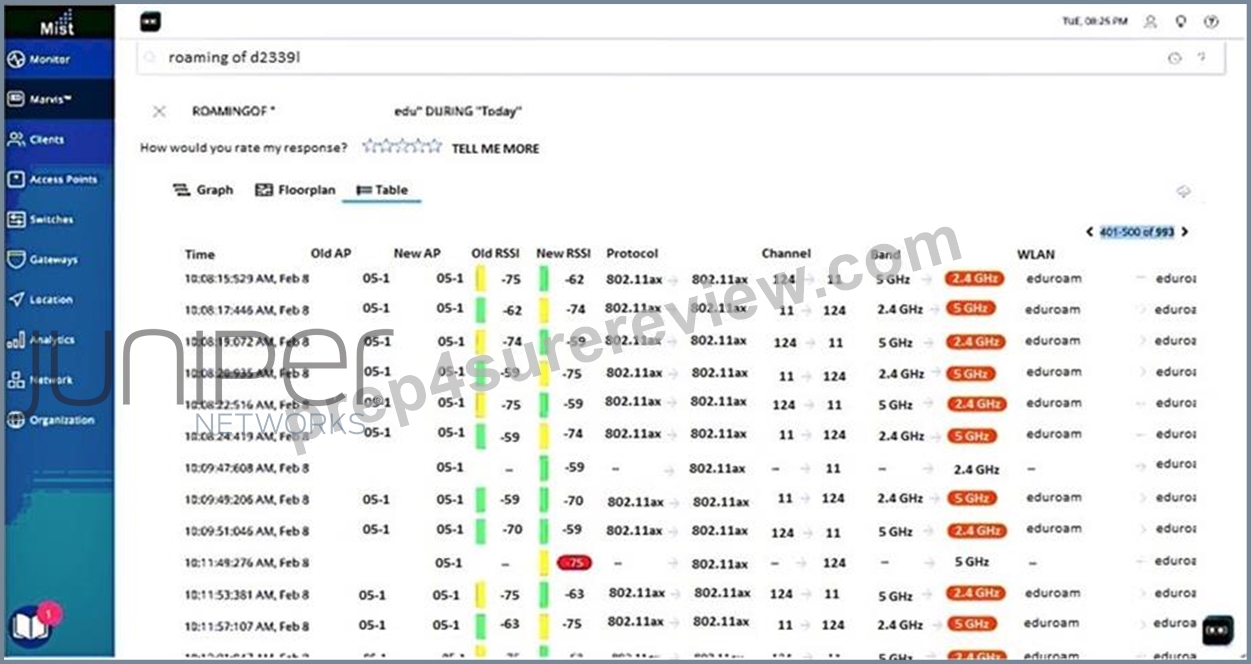
A user opened a ticket. Upon troubleshooting, you determine that frequent roaming is the root cause of the problem.
Referring to the exhibit, which statement describes the roaming issue that the client is experiencing?
- A. There are frequent roams between different WLANs.
- B. There are frequent roams between different protocols.
- C. There are frequent roams between different access points.
- D. There are frequent roams between different bands.
Answer: C
NEW QUESTION # 48
What does the term "DTIM interval" refer to in a wireless network?
- A. The interval at which the AP transmits buffered broadcast and multicast frames for sleeping clients
- B. The time between firmware update checks
- C. The time between DHCP renewals
- D. The interval between RF scans for rogue detection
Answer: A
Explanation:
The Delivery Traffic Indication Message (DTIM) interval determines how often an AP sends buffered broadcast and multicast traffic to clients that are in power-save mode, balancing battery efficiency with timely delivery of multicast data.
NEW QUESTION # 49
Click the Exhibit button.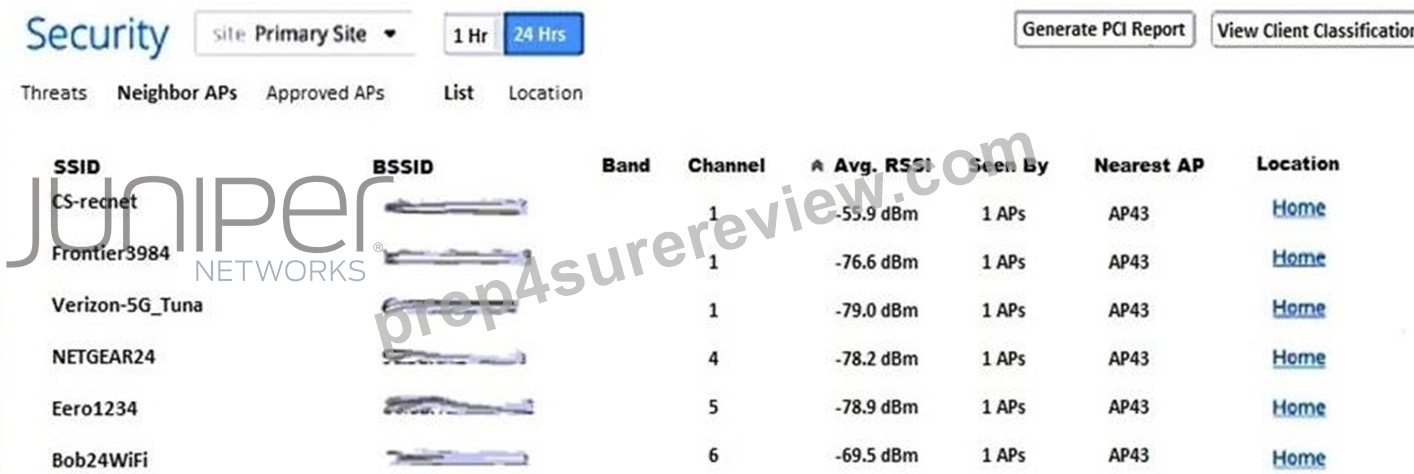
Referring to the exhibit, which two statements are correct? (Choose two.)
- A. The WLAN with SSID Eero1234 will cause adjacent channel interference.
- B. The WLAN with SSID Verizon-5G_Tuna will cause adjacent channel interference.
- C. The WLAN with SSID Bob24WiFi will cause adjacent channel interference.
- D. The WLAN with SSID NETGEAR24 will cause adjacent channel interference.
Answer: A,D
NEW QUESTION # 50
What are two ways to access Marvis? (Choose two.)
- A. Use config templates.
- B. Use Actions.
- C. Use the conversational assistant.
- D. Use Insights.
Answer: B,C
Explanation:
Reference: https://www.mist.com/resources/mist-marvis-overview/
NEW QUESTION # 51
A large enterprise is deploying a campus-wide wireless network using Mist. They need to provide a secure corporate network for employees and a completely separate, tunneled network for guest traffic that terminates in a DMZ. They also need to provide a dedicated, tunneled network for IoT devices. All of these services must be available from a single set of APs. Which Mist components and policies are required to create this multi-service, segmented network? (Select all that apply.)
- A. A configuration where the 'Corporate' and 'IoT' WLANs are mapped to the data center tunnel, and the 'Guest' WLAN is mapped to the DMZ tunnel.
- B. Two Mist Tunnel objects: one pointing to the data center cluster and one pointing to the DMZ cluster.
- C. A separate physical AP for each network type (Corporate, Guest, IoT).
- D. A WxLAN policy to block traffic between the Corporate, Guest, and IoT VLANs.
- E. A Juniper Mist Edge cluster in the corporate data center and another in the DMZ.
- F. A single WLAN template applied to the site containing three distinct SSIDs: 'Corporate', 'Guest', and 'IoT'.
Answer: A,B,E,F
NEW QUESTION # 52
A user is trying to access a local printer but is being blocked. You suspect a WxLAN policy is the cause.
Where in the Mist dashboard would you look to see which policy rule is blocking the traffic for that specific user?
- A. In the Client Insights page, under the "Security" events.
- B. In the main SLE dashboard for the site.
- C. In the RF Template settings.
- D. In the Packet Capture tool.
Answer: A
NEW QUESTION # 53
You discover that some clients do not use all channels in the 5 GHz UNII-2 Extended frequency band and you have made the appropriate adjustments in the RF template. How do you implement these changes?
- A. Restart the APs.
- B. Optimize the frequency by selecting Optimize Now.
- C. Restart the clients.
- D. Restart the WLANs.
Answer: B
Explanation:
In a Juniper Mist environment, the Radio Resource Management (RRM) system is responsible for the automated allocation of channels and transmit power across all Access Points (APs) at a site. When you modify an RF Template-for example, by excluding specific UNII-2 Extended channels that certain legacy or region-specific clients cannot "see" or support-you are updating the intended policy for the network.
However, because Mist RRM is designed for stability, it does not always force an immediate, disruptive channel change across the entire site the moment a template is saved.
To force the Mist AI engine to immediately recalculate the channel plan based on your new constraints and push those settings to the APs, you use the Optimize Now button. This feature is found within the Radio Management section of the site settings or the RF template application page. When "Optimize Now" is triggered, the Mist Cloud analyzes the current RF environment, takes your new channel exclusions into account, and issues a command to the APs to switch to the most efficient channels available within the newly defined subset.
Choosing Restart the APs (C) or Restart the WLANs (B) is unnecessary and causes more downtime than required. A reboot might eventually result in a new channel selection, but it does not guarantee that the RRM algorithm has fully processed the global optimization for the site. Restarting clients (D) does nothing to change the AP's channel behavior. By using Optimize Now (A), you ensure a coordinated, AI-driven transition that minimizes "co-channel interference" while respecting the updated frequency constraints you defined to accommodate your specific client devices. This ensures that clients previously struggling with unsupported UNII-2 channels are immediately moved to compatible frequencies.
NEW QUESTION # 54
An administrator needs to create a WxLAN policy that allows all authenticated employees to access the internet but prevents them from accessing a specific internal server with the IP address 10.100.1.50, which hosts sensitive financial data.
Which two WxLAN policy rules, in the correct order, would accomplish this? (Choose 2.)
- A. Rule 1: User: 'Employee' -> Resources: '10.100.1.50' -> Action: 'Deny'
- B. Rule 1: User: 'Employee' -> Resources: 'Public-Internet' -> Action: 'Allow'
- C. The final default rule for 'All Users' should be set to 'Deny'.
- D. Rule 2: User: 'Employee' -> Resources: 'All Resources' -> Action: 'Allow'
- E. Rule 2: User: 'Employee' -> Resources: 'Public-Internet' -> Action: 'Allow'
Answer: A,D
NEW QUESTION # 55
You are asked to set up occupancy analytics for an office that has an existing Mist AP.
Which three types of devices are counted by default? (Choose three.)
- A. BLE assets
- B. Wi-Fi clients
- C. Zigbee clients
- D. mobile app clients
- E. cellular clients
Answer: B,D,E
Explanation:
According to the Cisco Catalyst 9800 Series Wireless Controller Software Configuration Guide3, three types of devices that are counted by default for occupancy analytics are:
* Mobile app clients, which are devices that have a mobile app installed with the Mist SDK or BLE beaconing enabled.
* Cellular clients, which are devices that have cellular connectivity and can be detected by Mist APs using LTE sensing.
* Wi-Fi clients, which are devices that have Wi-Fi connectivity and can be detected by Mist APs using Wi-Fi scanning.
References: https://www.cisco.com/c/en/us/td/docs/wireless/controller/9800/17-2/config-guide/b_wl_17_2_cg
/occupancy-analytics.html
NEW QUESTION # 56
You are deploying three WLAN 2.4 GHz networks in your US-based site. You must ensure that each network frequency is unique and does not overlap with the other frequency channels.
In this scenario, which three OFDM channels should be used? (Choose three.)
- A. 0
- B. 1
- C. 2
- D. 3
- E. 4
Answer: A,B,E
Explanation:
When deploying three WLAN 2.4 GHz networks in your US-based site while ensuring that each network frequency is unique and does not overlap with other frequency channels, you should use OFDM channels 1, 6 and 11. So the correct answers are B.1, D.6, and A.11.
NEW QUESTION # 57
Which security standard is mandatory for WPA3, providing stronger protection against offline dictionary attacks compared to WPA2-PSK?
- A. CCMP
- B. Advanced Encryption Standard (AES)
- C. Simultaneous Authentication of Equals (SAE)
- D. TKIP
Answer: C
NEW QUESTION # 58
Once a client discovers an access point, what is the correct order of steps for successful 802.1X authentication?
- A. Open System Authentication -> Association -> 802.1X Authentication
- B. Association -> Open System Authentication -> 802.1X Authentication
- C. Association -> 802.1X Authentication -> Open System Authentication
- D. Open System Authentication -> 802.1X Authentication -> Association
Answer: A
Explanation:
Once a client discovers an access point, the correct order of steps for successful 802.1X authentication is Open System Authentication -> Association -> 802.1X Authentication. So the correct answer is D.Open System Authentication -> Association -> 802.1X Authentication.
NEW QUESTION # 59
An administrator connects a new AP45 to a switch port but notices it is not coming online. After checking the switch logs, they see the following:
LLDP Power Negotiation Log:
- Power Requested by PD: 29.3 W
- Power Granted by PSE: 15.4 W
Based on this log, what is the most efficient next step to bring the AP fully online?
- A. Reboot the access point.
- B. Claim the AP in the Mist dashboard.
- C. Configure the switch port to provide 802.3at or 802.3bt power.
- D. Replace the Ethernet cable.
Answer: C
NEW QUESTION # 60
......
Verified JN0-452 dumps Q&As - 100% Pass from Prep4SureReview: https://www.prep4surereview.com/JN0-452-latest-braindumps.html
Pass Exam With Full Sureness - JN0-452 Dumps with 137 Questions: https://drive.google.com/open?id=1rC4OtYw5i-Iot0NB7TsJmQviCLAlVj5u
